Lemon: Elevate Your Designs with Handwritten Charm
Understanding Lemon's Unique Appeal
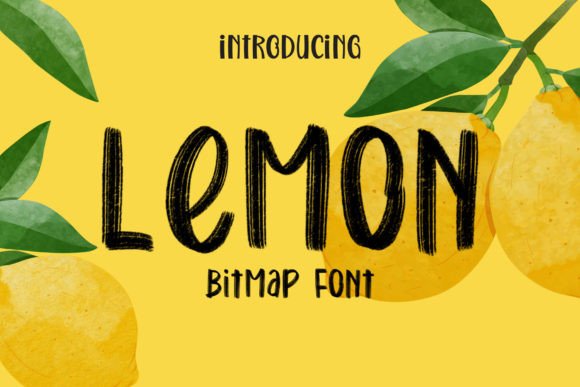
As a handwritten bitmap font, Lemon is designed with pixel-perfect clarity at specific sizes, ensuring crisp, detailed strokes that maintain their artistic integrity. This makes it particularly effective for projects where texture and character are paramount. When enabled in programs like Adobe Photoshop, you can appreciate the intricate brush-like details that give this typeface its authentic, hand-lettered quality.
Its versatility allows it to shine across numerous applications, from digital marketing to print design. Whether you're crafting social media graphics, developing packaging, or designing editorial layouts, Lemon adds a layer of creative authenticity that helps your work stand out.
Practical Applications Across Design Disciplines
Incorporating Lemon into your design workflow can transform various creative projects:
- Branding and Logo Design: Use Lemon to create logos, brand marks, and visual identities that feel approachable, artisanal, and unique. It's perfect for businesses in lifestyle, food, beauty, or boutique sectors.
- Marketing and Advertising: Capture attention in flyers, posters, and digital ads with headlines that feel personal and engaging.
- Web and UI Design: Apply Lemon to hero sections, call-to-action buttons, or testimonial quotes to add personality without sacrificing usability.
- Social Media and Content: Craft Instagram stories, Pinterest pins, and YouTube thumbnails with text that feels hand-crafted and authentic.
- Packaging and Print Design: Enhance product labels, business cards, and stationery with a tactile, premium aesthetic.
Mastering Color and Integration
A key strength of Lemon is its compatibility as a color font (OpenType-SVG), allowing for vibrant, multi-colored strokes directly within your type. This feature is supported in Photoshop, Illustrator, Silhouette, and Inkscape, offering creative flexibility.
To modify the font color in Adobe Photoshop:
- Right-click on the text layer and select Rasterize Type.
- Press Ctrl+U (or Cmd+U on Mac) to open the Hue/Saturation dialog.
- Check the Colorize option and adjust the sliders to achieve your desired color.
In Adobe Illustrator, the process involves rasterizing the text:
- Select your text and navigate to Object > Rasterize.
- Set the Resolution to High (300 ppi) and choose Transparent background.
- Then go to Edit > Edit Colors > Adjust Colors to shift the hue, saturation, and brightness.
Important Note: While Lemon is a versatile creative asset, the OTF/TTF files are not compatible with Cricut machines. Always ensure your design software supports OpenType-SVG fonts for full functionality.
Integrating Lemon into Your Design Strategy
Effective use of any typography element requires strategic thinking. Consider these factors when using Lemon:
- Visual Hierarchy: Use Lemon for headlines, subheadings, or key phrases where its personality can shine, pairing it with a cleaner sans-serif for body text.
- Audience Alignment: Its handwritten style resonates best with audiences seeking warmth, authenticity, and a personal connection.
- Consistency: Maintain a cohesive brand system by using Lemon consistently across touchpoints, reinforcing your visual identity.
- Readability: While beautiful at display sizes, test its clarity at smaller scales or on complex backgrounds.